
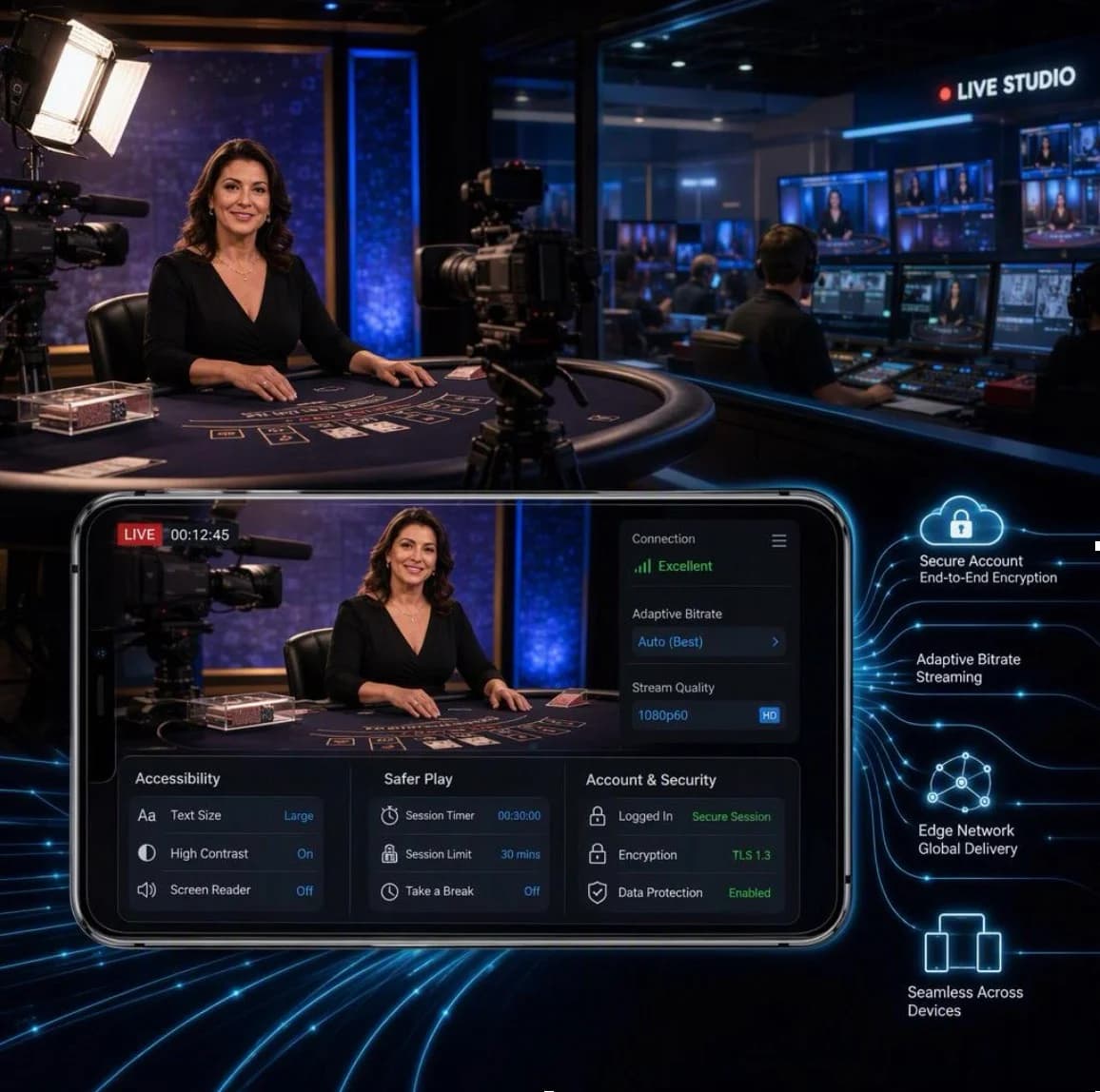
A live, interactive table stream is a surprisingly tough test for modern video technology. It has to look crisp, stay in sync, respond to a person’s input without awkward pauses, and keep working when the viewer is on a patchy mobile connection. All at once.
That makes real-time table gaming an interesting example of how far streaming platforms have come. The same underlying challenges appear in live sport, online auctions, remote events and video commerce, but table play adds another layer: physical actions at a studio table must be reflected accurately on a digital screen.
It’s not simply a camera pointed at a table. Behind the familiar view sits a carefully managed combination of broadcast production, low-latency delivery, interface design, security controls and safer-use features.
The physical set-up is the foundation. A polished live table feed normally begins in a purpose-built studio where lighting, sound and camera positions are controlled rather than left to chance.
Several cameras may cover a single table. One holds a wide shot of the presenter and playing surface, while others provide tighter views for cards, wheels or other game-specific details. This gives the production team options, much like a compact television gallery.
A typical studio workflow includes:
- High-resolution cameras positioned to make every relevant physical action visible
- Consistent, colour-balanced lighting that avoids reflections and deep shadows
- Close microphones and audio processing so speech remains clear over room noise
- A production control room where operators select camera feeds and monitor quality
- Graphics systems that display names, timers, table information and status messages
- Networked table equipment that records physical outcomes for the digital platform
The last part matters more than it may seem. If a card is dealt or a wheel comes to rest, the platform needs a dependable way to capture that result and pass it to the game server. Depending on the set-up, this can involve optical character recognition, sensors, barcode-style card reading, or trained studio procedures with checks built around them.
The player-facing display is then built as a composite. You’re watching live video, but the buttons, timers, game history and account information are rendered separately in the browser or app. That separation is useful because text and controls remain sharp on different screen sizes, rather than being baked into the camera feed.
It also means the interface can respond without needing the studio camera to change. A timer can count down, a notification can appear, or a control can become unavailable at the correct moment, all while the live picture continues.
Latency is the time between something happening in the studio and it appearing on your screen. For on-demand video, a delay of several seconds is rarely a problem. For interactive table play, it changes the whole feel of the experience.
If the delay is too long, viewers may see a presenter ask for an action after the opportunity to take it has already passed. If the stream keeps stopping to buffer, the experience becomes confusing. So engineers have to balance two competing needs: a lower delay and a stable picture.
The journey usually looks something like this:
- Cameras send video to a local production system.
- The feed is compressed by an encoder, often into several quality levels.
- Small video segments are sent to streaming servers and content delivery networks.
- The player selects the most suitable version for their device and connection.
- Interaction data travels separately between the interface and the game server.
That fourth step is where adaptive bitrate streaming does a lot of the quiet work. Rather than delivering one fixed-quality feed, the platform creates several versions. A reliable Wi-Fi connection may receive a higher-resolution version, while a device on an unstable mobile signal can switch to a lighter stream before playback stalls.
As the overview of adaptive bitrate streaming explains, the player can choose among different encoded versions based on available bandwidth and device performance. In practical terms, it’s why a stream may soften briefly rather than freeze altogether.
Sending every viewer’s video from one distant central server would be inefficient. Content delivery networks place copies of stream segments at locations nearer to groups of viewers. These local points of presence are often described as the network edge.
The shorter the route, the less delay and congestion a stream is likely to encounter. It doesn’t remove every problem, of course. Home Wi-Fi, mobile coverage, browser settings and device age all affect the final experience. But edge delivery gives the platform a better starting point.
There’s also a useful distinction between video delay and game-state accuracy. The video may arrive a few seconds after the studio action, while the interaction system uses tightly controlled timers and server-side rules. That way, the platform can make clear when input is accepted and when a round has moved on.
Most people don’t watch live services on a large monitor with perfect broadband. They open a browser during a break, use a phone on home Wi-Fi, or move between connections. A good live-table product has to expect this rather than treating it as an edge case.
Mobile-first design begins with performance. Heavy page elements, oversized animations and repeated background requests can make a phone warm up and drain its battery. The video player, control layer and account features need to be efficient enough to coexist without making the whole page sluggish.
Touch interaction adds another consideration. Buttons must be:
- Large enough to tap without repeated attempts
- Spaced so neighbouring controls aren’t selected by mistake
- Clear about their current state
- Easy to reach one-handed where possible
- Readable in varied lighting conditions
A strong interface also communicates what is happening. If the connection drops, say so plainly. If a request has been received, show that promptly. If a time window has closed, explain it rather than leaving the reader to guess.
Accessibility shouldn’t be bolted on at the end. Good contrast, scalable text, keyboard support, descriptive labels and sensible focus order help people use a service with greater confidence. They tend to improve the experience for everyone, not just those using assistive technology.
Live formats bring a visible human element, but that doesn’t mean technology takes a back seat. In many ways, the need for dependable records is greater because a physical table and a digital account must agree at every stage.
Secure account systems typically protect sign-in activity, flag unusual access patterns and keep sensitive information separate from the visual entertainment layer. Payment handling requires encrypted connections and carefully limited access to data. Readers interested in the wider principles can find a useful plain-English overview from the UK National Cyber Security Centre.
Audit trails are another key piece. Platforms need records of session events, user actions, game timings and confirmed outcomes. These logs support customer queries, technical investigations and operational checks. The important point is that the record is produced as part of the system, rather than reconstructed later from memory.
Live-dealer formats also differ from games driven entirely by a random number generator, often shortened to RNG. An RNG-led game uses software to generate outcomes within its programmed system. A live table format instead combines a real-world event, a studio process and digital recognition or verification. Both still depend on software, but the source of the visible outcome is different.
For readers who want to see how these elements appear in a consumer-facing UK product, a Virgin Games live casino interface provides a practical example of the format. It is intended for adults only, and features such as account controls, clear session information and safer-play tools should be treated as important product-design considerations, not an invitation to take part.
Any adult-only gambling product carries responsibilities that go beyond smooth video delivery. Safer-use tools work best when they are straightforward to find, easy to understand and available before someone feels they need them.
This can include:
- Age and identity checks before access is granted
- Account limits selected by the account holder
- Time reminders and session information
- Options to pause access or use formal exclusion controls
- Clear account history and support links
- Friction at moments where an informed choice matters
The design challenge is to make these features part of the normal account journey rather than hiding them several menus deep. Clear wording matters too. If a person is setting a limit or taking a break, the product should explain what will happen in plain language.
The Gambling Commission’s consumer information is a useful starting point for adults seeking guidance on gambling-related protections and choices in Great Britain.
The next developments are likely to be less about replacing the live studio and more about supporting it.
Artificial intelligence can assist operational teams by spotting technical anomalies, detecting unusual patterns in account activity, or helping moderation teams review large volumes of non-sensitive system signals. But it should be used carefully. Automated flags are not the same as human judgement, and systems need testing for errors, bias and privacy implications.
Augmented reality is another area worth watching. Rather than placing gimmicks over the video, it could offer clearer, optional ways to present table information. Think subtle labels that remain anchored to a relevant area of the screen, or layout choices that help a viewer understand what they’re seeing on a smaller display.
The best future-facing work will probably be the least flashy. Faster recovery from poor connections, better captions, clearer controls, stronger account protection and more understandable safety tools are all more useful than novelty for its own sake.
Real-time table gaming shows what happens when broadcast engineering, web development and careful interface design meet in one place. When it works well, the viewer barely notices the machinery underneath. They simply see a clear live picture, understand what’s happening, and remain in control of how they use the service.



Comments
No comments yet. Be the first to share your thoughts.