

After drafting an email, Gmail gives you a short grace period after hitting send in case you spot a mistake. By default it’s only 5 seconds, but you can stretch that up to 30 seconds. Here’s how to change it and why it’s worth doing.
When you send an email, Gmail holds it for a few seconds before it actually leaves your outbox. During that window, a small “Undo” prompt appears on your screen. If you tap or click it, the email gets pulled back as a draft so you can fix it before resending.
It’s not magic. If the window closes before you click “undo,” the email is gone, and there’s no recall option after that. So the length of that window matters more than people realize.
- Go to mail.google.com and log in
- Click the gear icon in the top right corner
- Click “See all settings”
- Find the “Undo Send” option under the General tab
- Open the dropdown menu and pick 10, 20, or 30 seconds
- Scroll to the bottom and click “Save Changes”
That’s it. The new setting applies immediately to any email you send afterward.
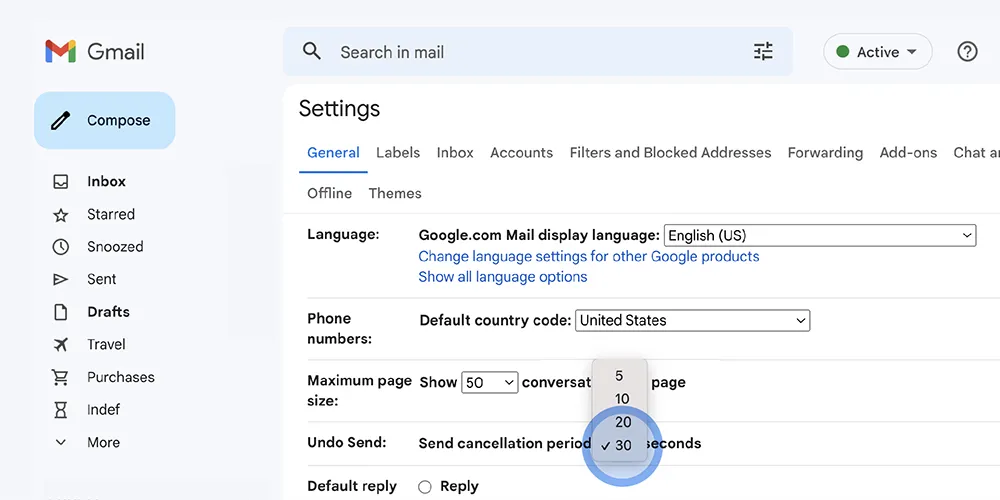
Here’s the catch: the Gmail app on Android and iPhone doesn’t have a setting for this. The Undo Send option only exists in the desktop version of Gmail.
If you want to change it from your phone, you can still do it through a browser:
- Open Chrome (or another browser) on your phone
- Go to mail.google.com
- Tap the three dots in the top right corner
- Select “Desktop site”
- Once the desktop version loads, follow the same steps as above (gear icon, See all settings, Undo Send, pick your time, save)
After that, the new setting will apply across the Gmail app too, since it’s tied to your account, not the device.

Five seconds isn’t much time to notice you attached the wrong file, forgot to CC someone, or sent a message to the wrong person entirely. Bumping it up to 20 or 30 seconds gives you an actual chance to catch those mistakes instead of relying on reflexes.
It’s a small setting, but it’s one of those things that only matters the one time you really need it.



Comments
No comments yet. Be the first to share your thoughts.